


The worst scenario can happen. Imagine a massive storm moving through your area, resulting in severe flooding. Water rushes into your offices, destroying equipment and drenching your paper records. What if those records stored on your internal system and in filing cabinets were your only copies? This is why you need an IT disaster recovery plan in place.
Your responsibilities require you to manage extensive amounts of electronic data. To safeguard this data and protect your company from liability, you must anticipate unexpected events, ranging from natural disasters like flooding to cyberattacks.
Developing a comprehensive IT disaster recovery plan helps ensure business continuity in the face of adversity; here’s how to create the plan.

What is an IT Disaster Recovery Plan?
An IT disaster recovery plan (IT DRP) is a comprehensive and structured document that outlines the strategies and procedures an organization will follow to recover and restore its IT systems, data, and technology infrastructure in the event of a disruptive incident or disaster.
The primary purpose of an IT disaster recovery plan is to ensure the continuity of critical IT functions and minimize the impact of disruptions caused by various factors, such as natural disasters, cyberattacks, hardware failures, or human errors.
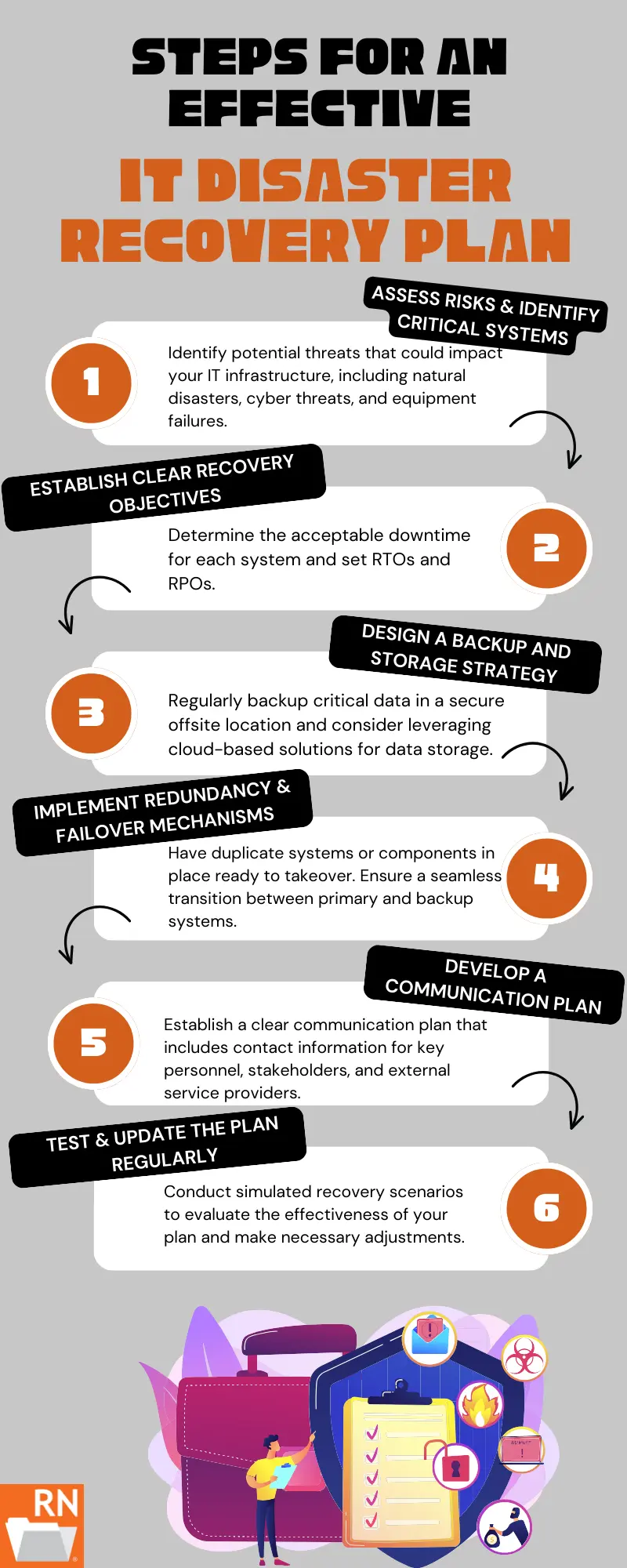
Steps for an Effective IT Disaster Recovery Plan
Step 1: Assess Risks and Identify Critical Systems
The first step in developing a resilient disaster recovery plan is to conduct a thorough risk assessment by creating prioritized risk tiers: customer-facing platforms and systems (tier 1), internal operational systems (tier 2), and archival systems or any other low-impact platform (tier 3).
Identify potential threats that could impact your IT infrastructure, including natural disasters, cyber threats, and equipment failures. Once you understand the risks, prioritize critical systems and data that are essential for day-to-day operations. Knowing which components are most crucial will guide your efforts in developing a targeted recovery strategy.
Step 2: Establish Clear Recovery Objectives
Define specific recovery objectives for each critical system and tier. This involves determining the acceptable downtime for each system and setting recovery time objectives (RTOs) and recovery point objectives (RPOs).
RTO specifies the maximum allowable downtime, while RPO indicates the maximum data loss permissible. For example, tier 1 platforms (the highest priority) may correlate to the shortest RTO (several hours), while the lowest tier 3 platforms may have an RTO of several days.
Clearly defined objectives will guide your recovery efforts and help minimize disruptions during a disaster. The table below shows a hypothetical RTO and RPO for each tier; however, you should establish benchmarks based on your company’s unique response needs.
| System Tier | Examples of Systems in the Tier | Target RTO | Target RPO |
| Tier 1 (critical) | All customer-facing systems and platforms, email, phone, and order processing system | Less than 4 hours | Less than 15 minutes |
| Tier 2 (internal and important systems) | Internal databases, CRMs, CMSs, and file servers | Less than 24 hours | Less than 4 hours |
| Tier 3 (low-impact systems and archival systems) | Any archived reporting, historical records, any logs that aren’t critical to the company | 3 – 5 days | 24 hours |
Step 3: Design a Comprehensive Backup and Storage Strategy
A reliable backup and storage strategy is the backbone of any effective disaster recovery plan and it needs to follow the 3-2-1 strategy: three copies of all data, saved on two different media types, with one copy saved remotely (via the cloud or off-site).
Regularly back up critical data and ensure that backups are stored in a secure off-site location. Consider leveraging cloud-based solutions for data storage, as they offer scalability, accessibility, and redundancy. Automated backup processes can streamline the task and ensure that data is consistently and securely stored. If your business still uses backup tapes, storing these at a secure off-site location will ensure the safety of this data as well.
Step 4: Implement Redundancy and Failover Mechanisms
To enhance the resilience of your IT infrastructure, implement redundancy and failover mechanisms. Redundancy involves having duplicate systems or components in place, ready to take over if the primary system fails; typically these systems should be in the cloud or via an off-site location.
Failover mechanisms, which may include a secondary ISP, ensure a seamless transition between primary and backup systems, minimizing downtime. These measures are particularly crucial for mission-critical applications and services.
Step 5: Develop a Communication Plan
Design a tiered communication tree or grid that outlines the primary and secondary contacts in the event of an IT disaster. Your communication plan must include contact information for key personnel, stakeholders, and external service providers.
Ensure that everyone is aware of their roles and responsibilities during a recovery and that escalation thresholds are clearly defined for each stakeholder. The communication plan also must outline outreach efforts to customers and regulators and must address the key communication channels for all messaging.
Regularly update contact information, conduct drills, and establish communication protocols to facilitate efficient coordination in times of crisis.
Step 6: Test and Update the Plan Regularly
Regular testing is essential to identify weaknesses and ensure that all components of the plan work seamlessly. Testing may include quarterly reviews of the plan, a yearly disaster recovery simulation, and a post-simulation review to discuss any gaps or issues in the plan (and the response).
Additionally, update the plan regularly to reflect changes in your IT infrastructure, personnel, or business processes.
Master Your IT Disaster Recovery Plan with Record Nations
In conclusion, investing time and resources in developing a robust IT disaster recovery plan is a proactive approach that pays dividends when you and the IT team are faced with unexpected challenges. It not only protects your data and systems but also instills confidence in your company’s leadership and its stakeholders that your team (and the business) has prepared for these emergencies.
Preparedness is the key to resilience. Safeguarding your business against unforeseen events requires diligence and proactive planning. By following the steps outlined in this guide, you can create a comprehensive and effective disaster recovery plan that positions your team and the business for continued success.
Don’t leave your business at risk – start crafting your IT disaster recovery plan today. Ensure the safety of your data, the continuity of your operations, and the trust of your stakeholders. Call Record Nations at (866) 385-3706, fill out the form, or use the live chat to start your plan today.
FAQ
What’s the difference between RTO and RPO?
Recovery Time Objective (RTO) denotes how long a system can be offline or ‘down’ before it impacts operations, while the Recovery Point Objective (RPO) is a measure of time that refers to the maximum data loss that the business can financially endure. For critical systems, both RTO and RPO will be low.
Should I store my IT disaster backups on-site or off-site?
Your backup plan should follow the 3-2-1 strategy; this means you need three copies of all data, stored on two different types of media, with one backup stored remotely via the cloud or off-site.
Do I need a separate disaster recovery plan for cyberattacks and natural disasters?
No, however, as each disaster requires a unique response, your IT disaster recovery plan should address each type of disaster response. Include a communications plan detailing how your team (and your company) plans to respond to customers and regulators in the event of each of these disasters. RTO and RPO for system tiers, though, may not change.
What’s the difference between a disaster recovery plan and a business continuity plan?
A disaster (data) recovery plan focuses on how to ensure that all systems are restored, that data is recovered, and the risk is addressed and remediated. A business continuity plan guides the operation of the business during an IT disaster. These plans should complement each other.
Who should be responsible for maintaining an IT disaster recovery plan?
The IT leadership (Chief Technology Officer) and the supporting team typically hold the responsibility for maintaining, updating, and testing the recovery plan. However, the team’s plan also needs to outline how other leadership and team members need to respond during an IT disaster and detail the role and responsibility of each stakeholder during an IT crisis.